
Getting Started
This tutorial will guide you step by step through creating your first AI workflow on the OpenAgentAGI platform. We will build an AI agent for short-term gold market analysis.
What we’re building
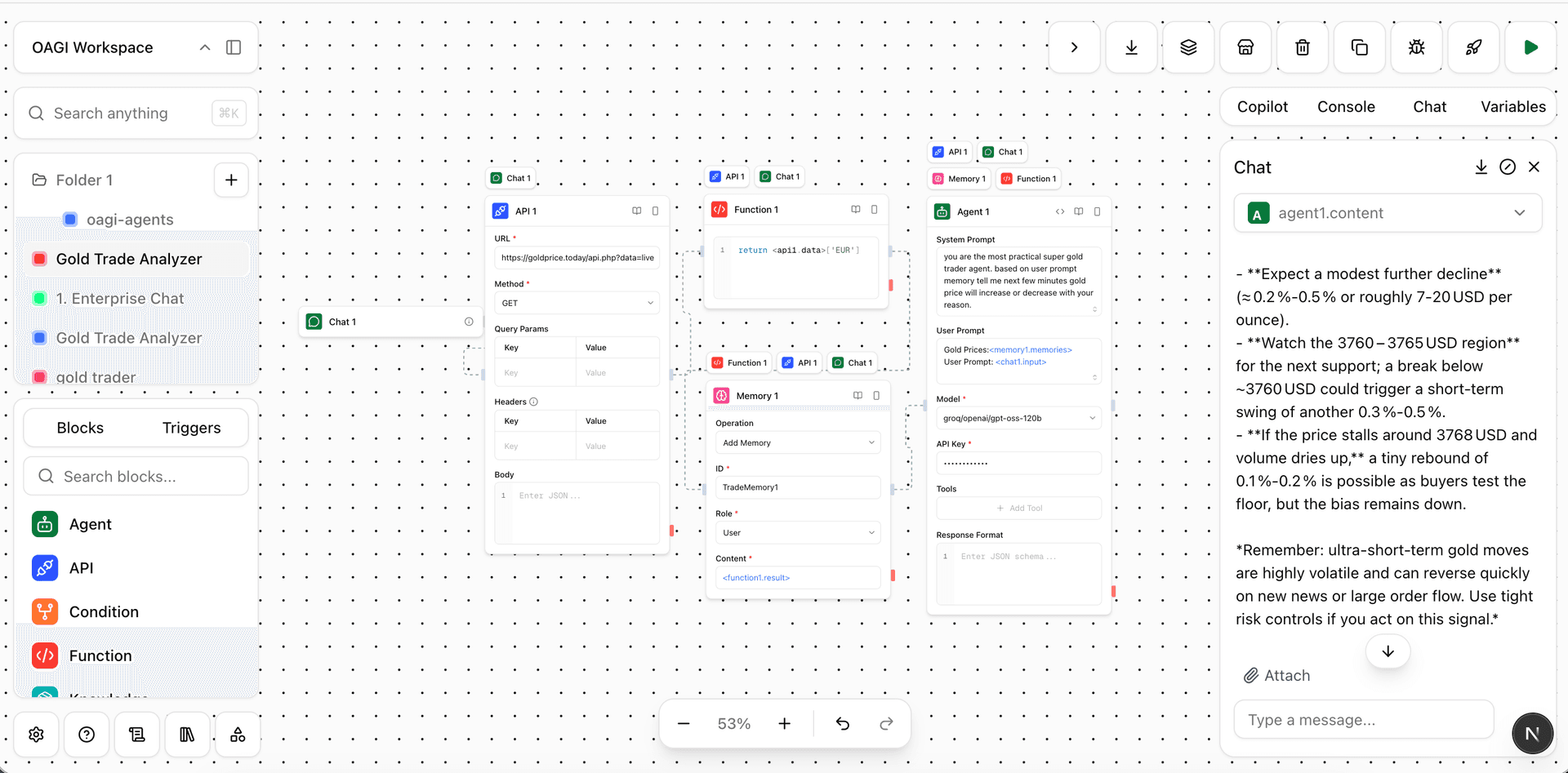
Step-by-step guide
An agent for short-term gold analysis with the following capabilities:
-
Receive user requests (prompts) via a chat interface.
-
Use an API Block to call the current live gold price (https://goldprice.today/api.php?data=live).
-
Use a Function Block to get the price in the desired currency (
return <api1.data>['EUR']). -
Use a Memory Block to store past and current gold prices.
-
Use an Agent Block to generate a short-term analysis by comparing past and current prices using a large language model.
-
Finalize and deploy the created agent (workflow).
Detailed video tutorial
Next Steps
Add More Blocks
Learn about API, Function, and Condition blocks
Use Tools
Integrate with external services like Gmail, Slack, and Notion
Add Custom Logic
Use Function blocks for custom data processing
Deploy Your Workflow
Make your workflow accessible via REST API
Need Help?
Stuck on a step? Check our Blocks documentation for detailed explanations of each component.
Want to see more examples? Browse our Tools documentation to see what integrations are available.
Ready to deploy? Learn about Execution and Deployment to make your workflows live.